

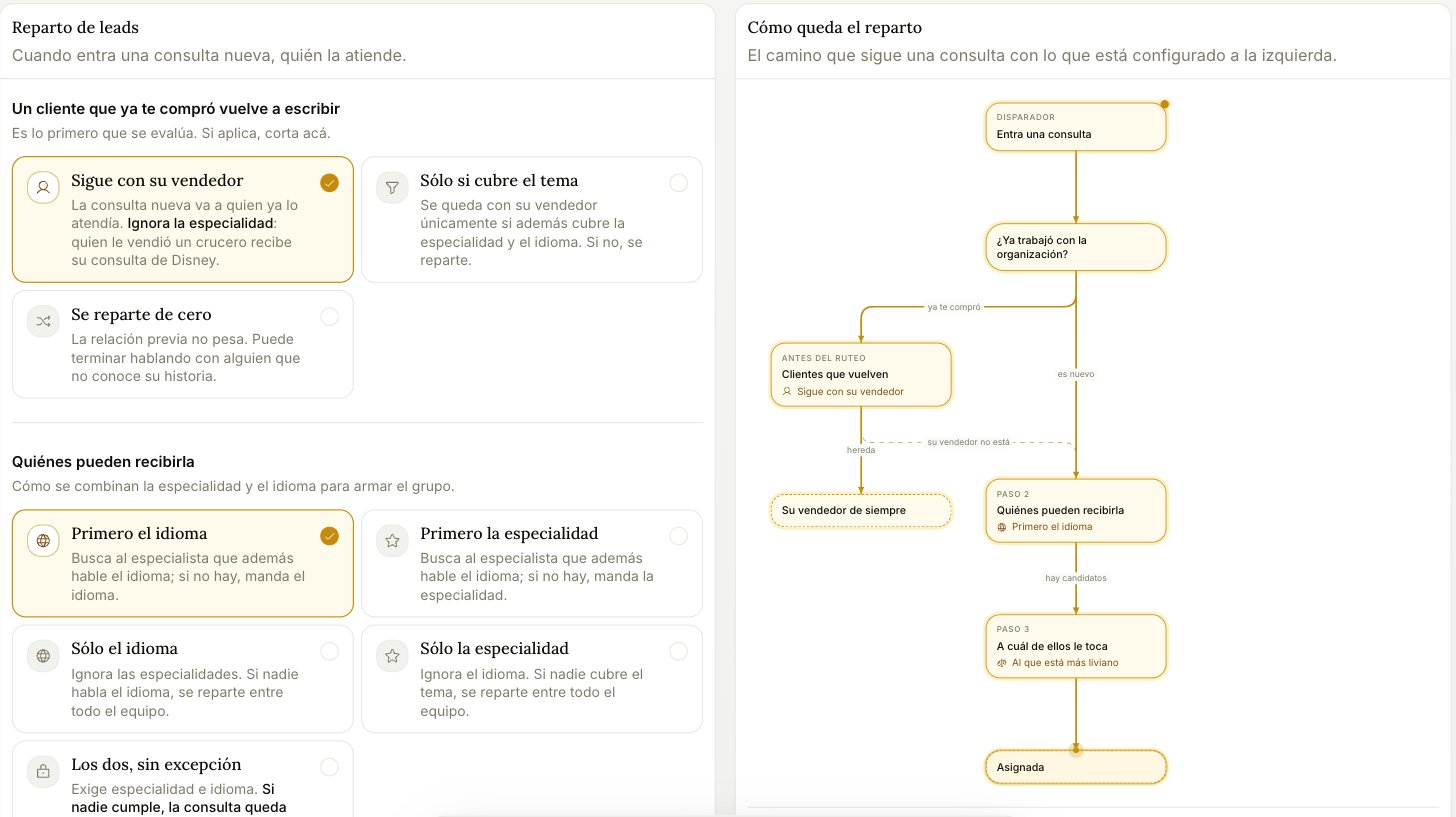
1. A returning customer writes again
Evaluated first, and if it applies, routing stops here.- Stays with their rep — the new inquiry goes to whoever handled them before. It ignores specialty: whoever sold them a cruise gets their Disney inquiry too.
- Only if they cover the topic — stays with their rep only if that rep also covers the specialty and the language. Otherwise it goes to the pool.
- Routed from scratch — prior relationship doesn’t count. They may end up with someone who doesn’t know their history.
2. Who’s eligible
How specialty and language combine to form the candidate pool.
Each rep’s specialties and languages are set in Team.
3. Which one of them gets it
- Whoever’s lightest — looks at active load, today’s leads, and what they’ve let go cold. Open quotes count as load.
- Round robin — goes to whoever hasn’t received one in longest. Doesn’t look at load at all.
If an inquiry ends up unassigned, a process rescues it within the hour. It won’t sit there forever — but it will sit there for up to an hour, which is a reason to be careful with “Both, no exceptions”.